VIOLIN Function References
Input and Output Functions (violin.in_out)
This section details the functions which handle the input files and output of VIOLIN.
For more information on the types of accepted inputs, see BioRECIPE.
Functions
- violin.in_out.preprocessing_model(model: str) pandas.core.frame.DataFrame[source]
This function checks whether the model is correct and verifies that all necessary columns are present.
It accepts an executable BioRECIPE model provided in .txt, .csv, .xlsx, or .tsv format. Thefile’s content will be convert into lower case. Additionally, A ‘Listname’ is created as a unique identifier for every element for further indexing.
- Parameters
model (str) – A name of file which includes an executable BioRECIPE model.
- Returns
new_model – A formatted model dataframe.
- Return type
pd.DataFrame
- violin.in_out.preprocessing_reading(reading: str, evidence_score_cols: Optional[dict] = None, atts: Optional[list] = None) pandas.core.frame.DataFrame[source]
This function import the reading file and check if the reading format is correct.
- Parameters
reading (str) – A pathname of the machine reading spreadsheet output or interactions set from database, in BioRECIPE format. Accepted file: .txt, .csv, .tsv, .xlsx.
evidence_score_cols (list) – A list of column headings used to identify identical interactions.
atts (list) – A list of additional attributes which are available in interactions set. Default is none.
- Returns
new_reading – A formatted reading dataframe, including evidence count and list of PMCIDs.
- Return type
pd.dataframe
- violin.in_out.output(reading_df: pandas.core.frame.DataFrame, file_name: str, classify_scheme: str = '1', kind_values: Optional[dict] = None) None[source]
This function outputs the classified interactions. The output filenames are composed with {file_name_prefix}_{category}.csv.
- Parameters
reading_df (pd.dataframe) – A classified dataframe of a interactions set.
file_name (str) – A prefix of output filename.
classify_scheme (str) – Scheme approach to classify, available options are ‘1’, ‘2’, and ‘3’.
kind_values (dict) – A dictionary containing the numerical values for the Kind Score classifications. Default values are found in KIND_DICT.
Defaults
Default Reading Columns
85                      "Regulated Name", "Regulated Type", "Regulated Subtype", "Regulated HGNC Symbol",
86                      "Regulated Database", "Regulated ID", "Regulated Compartment", "Regulated Compartment ID",
87                      "Sign", "Connection Type", "Mechanism", "Site",
88                      "Cell Line", "Cell Type", "Tissue Type", "Organism"]
89
90BioRECIPE_READING_COL = ["Regulator Name", "Regulator Type", "Regulator Subtype", "Regulator HGNC Symbol",
91                         "Regulator Database", "Regulator ID", "Regulator Compartment", "Regulator Compartment ID",
Default Model Columns (From BioRECIPE format)
69                "path mismatch" : 19,
70                "self-regulation" : 18,
71                "flagged4" : 17,
72                "flagged5" : 16}
Formatting Functions (violin.formatting)
This section details the formatting functions of VIOLIN, used during model and interaction list.
The formatting, as it:
identifies duplicate interactions in the interactions list,
counts the number of times an interaction was found in the interactions list (Evidence Score),
creates a unique identifier for every element based on their name, type, subtype, and compartment ID.
Functions
- violin.formatting.evidence_score(reading_df: pandas.core.frame.DataFrame, col_names: list) pandas.core.frame.DataFrame[source]
This function merges duplicate interactions and calculates evidence score of each interaction.
- Parameters
reading_df (pd.DataFrame) – A dataframe of the interaction list with BioRECIPE format.
col_names (list) – A list of column headings used to determine if interactions are identical.
- Returns
counted_reading – A new dataframe with the evidence count and PMCID list for each interaction.
- Return type
pd.DataFrame
- violin.formatting.get_listname(idx: int, model_df: pandas.core.frame.DataFrame) str[source]
Create the listnames by element attributes. This function generates unique identifiers for elements in the model network using the rules:
listname: {element_name}_{element_type}_{element_subtype}_{compartment_ID}
For the elements have multiple types and subtypes, the identifier only include the first entry.
If any attribute is empty, it is replaced with ‘nan’ in the list name.
These unique identifiers are then used by VIOLIN for further manipulation of the network information.
- Parameters
idx (int) – the row index of element in the model file.
model_df (pd.DataFrame) – A dataframe of a model.
- Returns
listname – A formatted name for regulator list column.
- Return type
str
Network Functions (violin.network)
This page details how paths are defined and found in the model in VIOLIN. Because of the compact nature of the BioRECIPES model format, the model must be converted into a node-edge list for use with the NetworkX Python package.
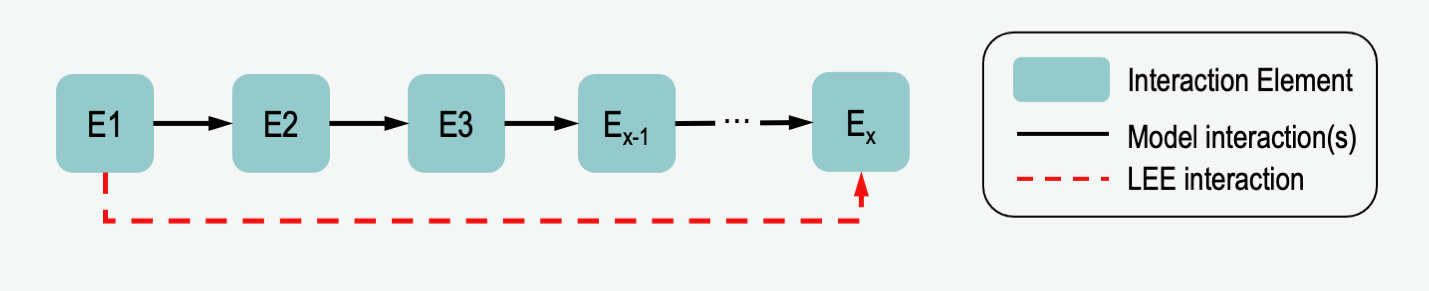
One special feature of VIOLIN is its ability to compare interactions from machine reading output, or interaction set from database, to paths that exist in the model. For two nodes, E1 and Ex, an iIS may exist with E1 regulating Ex. If in the model there is a path of multiple interactions where E1 regulates E2 which regulates E3 etc. to Ex, VIOLIN can identify this, and compare the iIS to this whole path. And indirect iIS may be a path corroboration to the model interaction, or a direct iIS may be a specification, identifying a more direct relationship between 2 nodes than is given in the model. This functionality reduces the number of false extensions.
Functions
- violin.network.node_edge_list(model_df: pandas.core.frame.DataFrame) networkx.classes.digraph.DiGraph[source]
This function converts a model from the BioRECIPE format into a node-edge list for use with NetworkX. The converted network is a directed graph.
- Parameters
model_df (pd.DataFrame) – A model dataframe, must be in BioRECIPE format.
- Returns
node_edge_list – A directed graph representation of the model.
- Return type
nx.DiGraph
- violin.network.path_finding(regulator: str, regulated: str, sign: str, model_df: pandas.core.frame.DataFrame, graph: networkx.classes.digraph.DiGraph, kind_values: dict, reading_cxn_type: str, reading_atts: dict, attributes: list, scheme='1') Union[str, int][source]
This function searches for a path in the model, where the source and target are the identifier of the matched elements, and calculates the kind score based on the results. The Dijkstra’s algorithm is used to find the shortest path. The path is identified as a negatively regulation between source and target, if the sum of edge weights is an odd number, and vice versa.
- Parameters
regulator (str) – An identifier of the source node.
regulated (str) – An identifier of the target node.
sign (str) – A sign of interaction from the Interaction Set (IS). available options: [‘positive’, ‘negative’].
model_df (pd.DataFrame) – Model dataframe
graph (nx.DiGraph) – Model edgelist to create network for finding paths between elements.
kind_values (dict) – Dictionary containing the numerical values for the Kind Score classifications.
reading_cxn_type (str) – Connection Type of interaction from reading - ‘i’ for indirect, ‘d’ for direct.
reading_atts (dict) – attributes from interaction, where keys are attributes names and values are attributes values.
attributes (list) – attributes list for reading file.
scheme (str) – The scheme of classification, i.e. ‘1’, ‘2’, or ‘3’.
- Returns
kind – Kind Score value for the interaction.
- Return type
int
Numeric Functions (violin.numeric)
This section describes the numeric operators of VIOLIN.
searching for an element in the machine reading output or the interactions set from databases,
comparing attributes, identifying whether a given attribute
matches exactly attribute in a corresponding model interaction,
is missing where a model interaction attribute is present,
is present where a model interaction attribute is missing,
mismatch from an attribute in a corresponding model interaction.
Both functions return numerical values to represent the outcome of the function.
Functions
- violin.numeric.get_attributes(A_idx: int, B_idx: int, sign: str, model_df: pandas.core.frame.DataFrame, attrs: list, path: bool = False) dict[source]
The function gets the attributes of the interaction in model, available attributes includes [Regulator Compartment, Regulator Compartment ID, Regulated Compartment, Regulated Compartment ID, Mechansim, Site, Cell Line, Cell Type, Tissue Type, Organism]. If Regulator Compartment is selected, Regulator Compartment ID will also be selected.
- Parameters
A_idx (int) – A row index of element A in the input model dataframe.
B_idx (int) – A row index of element B in the input model dataframe.
sign (str) – A sign of the interaction, available options: ‘positive’ or ‘negative’.
model_df (pd.DataFrame) – A DataFrame of a model with BioRECIPE format.
attrs (list) – An attributes list for interactions file.
path (bool) – An indicator if it is path interaction. Attributes will be empty if only path is found in model.
- Returns
model_atts – An dict of attributes for a model interaction.
- Return type
dict
- violin.numeric.find_element(search_type: str, element_name: str, element_type: str, model_df: pandas.core.frame.DataFrame, id_db: Optional[str] = None) Union[List, int][source]
This function finds the correct indices of an element within the model. Because elements can exist as multiple types (protein, RNA, gene, etc.), this function checks the element name/ID along with the element type. Function may return a list, if a given element of a specific type exists with varying attributes (such as different locations).
- Parameters
search_type (str) – An identifier of the element, available options are ‘hgnc’, ‘name’, and ‘id’.
element_name (str) – A name (or ID) of the element being searched for.
element_type (str) – A type of element (‘protein’, ‘protein family’, etc.)
model_df (pd.DataFrame) – A model dataframe within BioRECIPE format.
id_db (str) – A database name for provided identifier.
- Returns
location – All row indices of the model spreadsheet in which the element is found (returns -1 if not found).
- Return type
list|int
- violin.numeric.compare(model_atts: dict, reading_atts: dict) int[source]
- Compares a list of model attributes to the corresponding interaction attributes, returns numeric value
Attributes are the same (strong corroboration): 0
Some or all LEE attributes are missing (weak corroboration): 1
Some or all of the model attributes are missing (specification): 2
One or more model attribute differs from the LEE attributes (contradiction): 3
- Parameters
model_atts (dict) – A dictionary of attributes for a model interaction.
reading_atts (dict) – A dictionary of attributes for an event from a literactions list.
- Returns
value – The numerical representation of comparison outcome.
- Return type
int
Scoring (violin.scoring)
This part details the scoring functions of VIOLIN
Match Score
The Match Score (SM) measures how many new nodes are found in the interactions set with respect to the model. For an interaction in the Interactions Set (iIS) A → B, where A is the regulator and B is the regulated node, this calculation considers 4 cases which determine the scoring outcome:
Both A and B are in the model
A is in the model, B is not
B is in the model, A is not
Neither A nor B are in the model
Default Match Level scores are given for the assumption that the user wants to extend a given model without adding new nodes which may not be useful to the network. Thus, new regulators and new edges between model nodes are considered most important.
Kind Score
The Kind Score (SK) measures the edges of an iIS with respect to the model interaction. The Kind Score easily identifies the classification of an interaction, as well as searching for paths between nodes in the model when the iIS is identified as indirect. Using the same assumption from the Match Level calculation, the Kind Score represents the following scenarios:
Classification |
Definition |
|---|---|
Corroboration |
iIS matches model interaction |
Extension |
iIS contains information not found in model |
Contradiction |
iIS disputes information in MI |
Flagged |
Must be judged manually |
And within each classification, there are further sub-classifications. These subclassifications allow for more detailed scoring, if the user wishes.
Corroborations
Strong Corroboration: iIS matches MI exactly
Weak Corroboration Type 1: iIS matches direction, sign, connection type, and node type, of a model interaction but is missing additional attributes
Weak Corroboration Type 2: an indirect iIS matches direction and sign of direct model interaction with non-contradictory attributes
Weak Corroboration Type 3: an indrect iIS matches the direction and sign of a path in the model with non-contradictory attributes
Extensions
Full Extension: Neither source nor target of the iIS is in the model
Hanging Extension: The target of the iIS is in the model
Internal Extension: Both the source and target of the iIS are in the model, but there is no model interaction between them
Specification: iIS contains more information (attributes) than MI, or shows a direct relationship compared to Model Path
Contradictions
Direction Contradiction: The target and source of the iIS correspond to the source and target of the model interaction, respectively
Sign Contradiction: The regulation sign of the iIS is opposite of the corresponding model interaction (e.g. the iIS shows a positive regulation where the model interaction shows negative)
Attribute Contradiction: One or more of the iIS node attributes differs from that found in the corresponding model interaction
Flagged
Flagged Type 1: Mismatched Direction and non-contradictory Other Attributes with a Direct connection type in the model
Flagged Type 2: An iIS with a corresponding path which has one or more Mismatched Attributes
Flagged Type 3: An iIS which is a self-regulation based on the definition of model element (e.g. iIS has caspase-8 –> caspase-3, but the model considers cas-8 and cas-3 to be the same element)
Evidence Score
The Evidence Score (SE) is a measure of how many times an iIS is found. In the violin.formatting.evidence_score() function, column names
are defined to determine how the function determines duplicates. For example, the Evidence Score can be calculated by comparing all iIS attributes and all the columns of the interactions set.
So only an exact match between iISs will be counted as a duplicate. However, the user can also define fewer attributes, creating a more coarse-grained Evidence Score calculation.
Epistemic Value
In the NLP output, we sometimes receive an Epistemic Value (SB), which is a measure of the believability of an iIS. Zero, Low, Moderate, and High believability correspond to numerical scores of 0.0, 0.33, 0.67, and 1.0, respectively.
Total Score
The total score (ST) is calculated by
Functions
- violin.scoring.match_score(x: int, reading_df: pandas.core.frame.DataFrame, model_df: pandas.core.frame.DataFrame, match_values: Optional[dict] = None) int[source]
This function calculates the Match Score for an interaction from the reading.
- Parameters
x (int) – A row index of the dataframe of Interaction set (IS) to be scored
reading_df (pd.DataFrame) – The reading dataframe
model_df (pd.DataFrame) – The model dataframe
match_values (dict) – Dictionary assigning Match Score values Default values found in MATCH_DICT
- Returns
match – Match Score value
- Return type
int
- violin.scoring.kind_score(x: int, model_df: pandas.core.frame.DataFrame, reading_df: pandas.core.frame.DataFrame, graph: networkx.classes.digraph.DiGraph, counter: dict, kind_values: Optional[dict] = None, attributes: Optional[list] = None, classify_scheme: str = '1', mi_cxn: str = 'd') int[source]
This function calculates the Kind Score for an interaction in the Interactions Set (iIS). The kind score will be used to represent the subcategories. For further details, please find out in: https://www.biorxiv.org/content/10.1101/2024.07.21.604448v1.
- Parameters
x (int) – The row index for an iIS.
model_df (pd.DataFrame) – The model dataframe
reading_df (pd.DataFrame) – The reading dataframe.
graph (nx.DiGraph) – A directed graph of the model,used when function calls path_finding module.
counter (dict) – A dictionary to record the interactions that are identified as corroborated or contradicted interaction in model. Default value is None.
kind_values (dict) – Dictionary assigning Kind Score values. Default values found in KIND_DICT_A and KIND_DICT_B.
attributes (list) – A list of attributes compared between the model and the machine reading output. Default is None.
classify_scheme (str) – The scheme of the classification (‘1’, ‘2’, and ‘3’). Default is ‘1’.
mi_cxn (str) – What connection type should be assigned to model interactions if not available. Accepted values are “d” (direct) or “i” (indirect). Deafult is “d”.
- Returns
kind – Kind Score, score value.
- Return type
int
- violin.scoring.epistemic_value(x: int, reading_df: pandas.core.frame.DataFrame) float[source]
Finds the epistemic value of the interaction in Interaction Set (IS) (when available).
- Parameters
x (int) – The row index for an iIS.
reading_df (pd.DataFrame) – An IS dataframe.
- Returns
e_value – The Epistemic Value; if there is no Epistemic Value available for the reading, default is 1 for all interactions in IS.
- Return type
float
- violin.scoring.score_reading(reading_df: pandas.core.frame.DataFrame, model_df: pandas.core.frame.DataFrame, graph: networkx.classes.digraph.DiGraph, counter: Optional[dict] = None, kind_values: Optional[dict] = None, match_values: Optional[dict] = None, attributes: list = [], classify_scheme: str = '1', mi_cxn: str = 'd') pandas.core.frame.DataFrame[source]
This function creates new columns for the Match Score, Kind Score, Epistemic Value, and Total Score. it calls scoring functions and stores the values in the approriate column.
- Parameters
reading_df (pd.DataFrame) – The reading dataframe.
model_df (pd.DataFrame) – The model dataframe.
graph (nx.DiGraph) – directed graph of the model, necessary for calling kind_score module.
counter (dict) – A dictionary for counting the corrobrated and contradicted interaction. defulat value is None and ignore the counting step.
kind_values (dict) – Dictionary assigning Kind Score values. Default values found in KIND_DICT_A and KIND_DICT_B.
match_values (dict) – Dictionary assigning Match Score values. Default values found in MATCH_DICT.
attributes (list) – List of attributes compared between the model and the machine reading output. Default is None.
classify_scheme (str) – The scheme of the classification. Default value is ‘1’.
- Returns
scored = reading_df – reading dataframe with added scores.
- Return type
pd.DataFrame
Visualization (violin.visualize_violin)
VIOLIN’s visualization function creates a visual summary of the VIOLIN output, incuding total score, evidence score, and match score distributions.
The visualization function includes a filtering option, which can help the user make choices on how to use the VIOLIN output. Visualization can be filtered by three possible metrics:
“%x” : Returns the top X% of iISs, by Total Score
“Se>y” : Returns all iISs with an Evidence Score greater than Y
“St>z” : Returns all iISs with a Total Score grater than Z
When visualizing the total output, this function shows the score distributions by classification, as well as the classification distribution
When visualizing output of a single classification, the classification distribution is replaced by the number of iISs given that classification
When subcategories are identified in the Kind Score definition, additional plots of subcategory distribution are included
Class
- class violin.visualize_violin.ViolinPlot(file_name: str, filter_opt: str = '100%', match_values: Optional[dict] = None, kind_values: Optional[dict] = None, classify_scheme: str = '1')[source]
This creates figures of the VIOLIN output: evidence score, match score, and total score, and classification breakdown
- Parameters
match_values (dict) – Dictionary assigning Match Score Values.
kind_values (dict) – Dictionary assigning Kind Score values.
file_name (string) – VIOLIN output to be visualized. Can be specific classification, or choosing ‘TotalOutput’ file will visualize all VIOLIN output.
filter_opt (str) – How much VIOLIN output should be visualized. Can be filtered by top % of total score, evidence score (Se) threshold, or total score (St) threshold Accepted options are ‘X%’,’Se>Y’, or ‘St>Z’, where X, Y, and Z, are values. Default is ‘100%’ (Total Output).
- get_category_summary(category: str, save_name: str = '', save=False) None[source]
Plot the score (evidence, match, total) for specified categories.